
Evolution of Authentication on the Internet -3 #OAuth
Open Authorization (OAuth)

This is the 3rd part of the Evolution of Authentication on the Internet series. In the previous post, we covered one of the precursors to OAuth: SAML.

OAuth 2.0 (referred going forward as simply OAuth) is an authorization framework enabling third-party applications to obtain limited access to an HTTP service. – RFC 6749 in 2012. OAuth defines 4 roles:
Resource Owner: An entity capable of granting access to a protected resource. This is typically the end user.
Resource Server: The server hosting the protected resources.
Client: An application making protected resource requests on behalf of the resource owner and with its authorization.
Authorization Server: The server issuing access tokens to the client after successfully authenticating the resource owner and obtaining authorization. Analogous to the Identity Provider conceptualized in Part 1.

OAuth specifies the registration between a Client and Authorization Server via a set of Client ID and Client Secret. These credentials will become useful in the authorization flows defined below.
OAuth mandates the usage of TLS for the provider implementation (Authorization server).
Additionally, RFC 6749 explicitly defines the following objects:
Access Token: Access tokens are credentials used to access protected resources. An access token is a string representing an authorization issued to the client. The string is usually opaque to the client. Tokens represent specific scopes and durations of access, granted by the resource owner, and enforced by the resource server and authorization server. This access token is usually a JWT Token. (The OAuth RFC does not mandate or mention the usage of JWT)
Refresh Token: Refresh tokens are credentials used to obtain access tokens. Refresh tokens are issued to the client by the authorization server and are used to obtain a new access token when the current access token becomes invalid or expires, or to obtain additional access tokens with identical or narrower scope. Issuing a refresh token is optional and at the discretion of the authorization server.
Access Token Scopes: A scope is a set of permissions defined by the authorization server. From the client's perspective a scope is expressed as a list of space-delimited, case-sensitive strings. The authorization server may fully or partially ignore the scope requested by the client, based on the authorization server policy or the resource owner's instructions. Scopes are requested by the client using the "scope" request header. The Authorization server implementation defines these scopes arbitrarily, ex: Google Access token scopes such as calendar.events, calendar.events.readonly, etc. The Access tokens are issued for the scopes requested.
Before, we address the core flows defined under OAuth, let’s briefly discuss how the OAuth client, i.e. Service Provider registers with the OAuth Authorization server.
OAuth Client aka Service Provider
Every implementation of the OAuth Authorization server, allows the registration of OAuth clients, typically via an HTTP form. This includes creating dedicated credentials for the Client/Application in question, configuring trust parameters, client type, etc.
The OAuth client can be one of two types under the specification:
public
confidential
For confidential clients / SPs / Application, a set of client credentials (client_id & client_secret)are provisioned. These credentials are used to authenticate any requests the Client makes towards the OAuth Authorization server.
Authorization Flows
OAuth 2.0 specifies the following authorization flows:
Authorization Code Grant
Implicit Grant
Resource Owner Password Credentials Grant
Client Credentials Grant
Authorization Code Grant

A User issues a login request.
The SP redirects the browser to the IDP's authorization URL.
The Client (Browser) issues an authorization request towards the Authorization server. The Request contains the required parameters for the Authorization Code grant. (response_type must be code)
The Authorization server challenges the user for credentials via the login form.
The User provides the credentials. Additional the authorization server may explicitly request Consent for accessing information regarding the scopes provided.
The Authorization server authenticates and issues a one time Authorization code to the SP.
The SP uses the Authorization code, the client credentials and issues a request to the IDP for tokens.
The IDP responds with the access token post validation of the authorization code and client credentials. The user is successfully authorized.
The SP can further issue requests to the IDP for resources allowed via scopes.
Implicit Grant
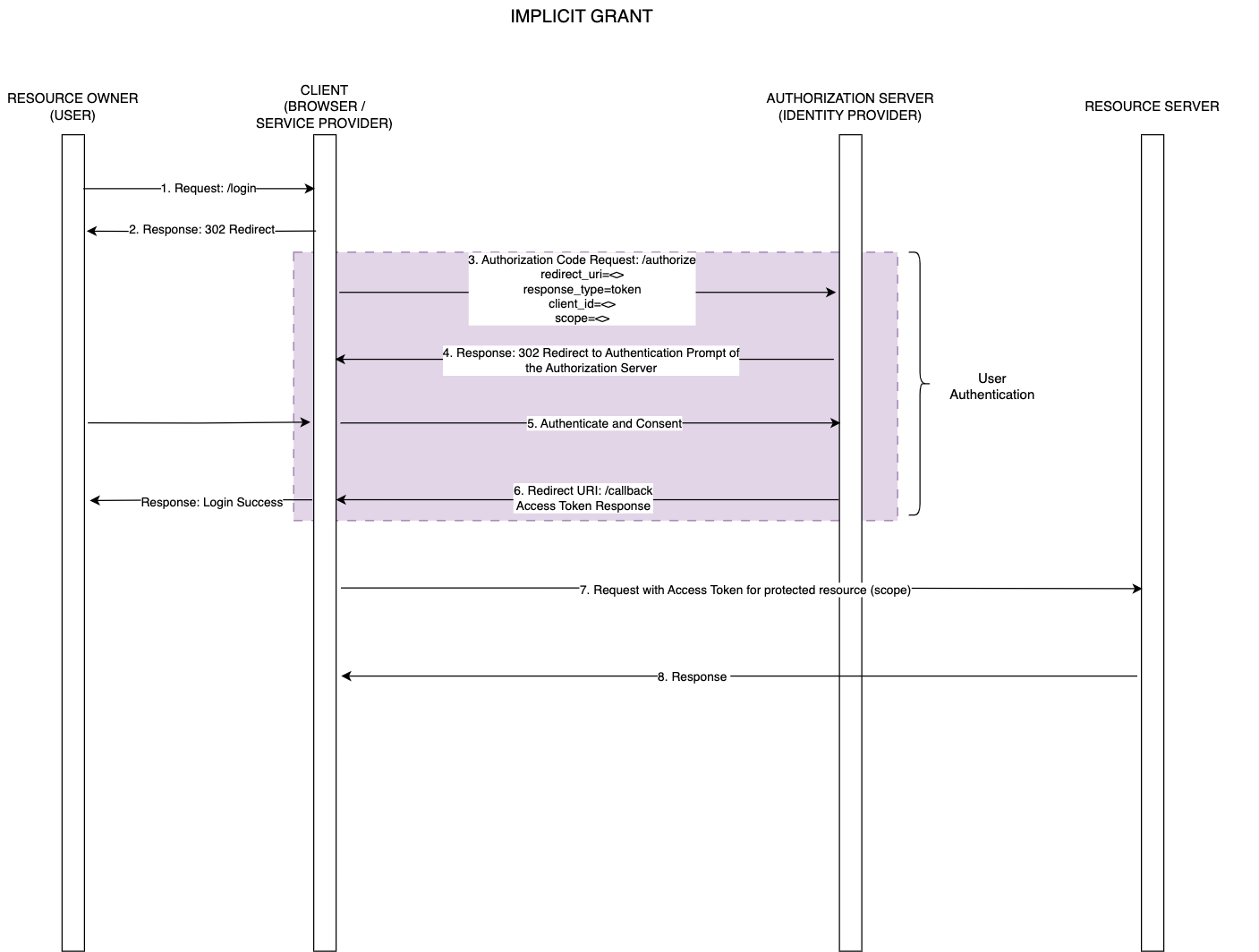
The User issues a login request.
The client application redirects the user to the Authorization server's authorization endpoint.
The client issues the authorization request. The response_type for this flow is set to token.
The Authorization server challenges the client for user credentials.
The User provides credentials to the authorization server. The authorization server may request explicit consent to provide access to scopes requested.
The Authorization server responds with token. The user is logged in.
The Client may further request access to resources from the authorization server using the access token based on the authorized scopes.
Resource Owner Password Credentials Grant
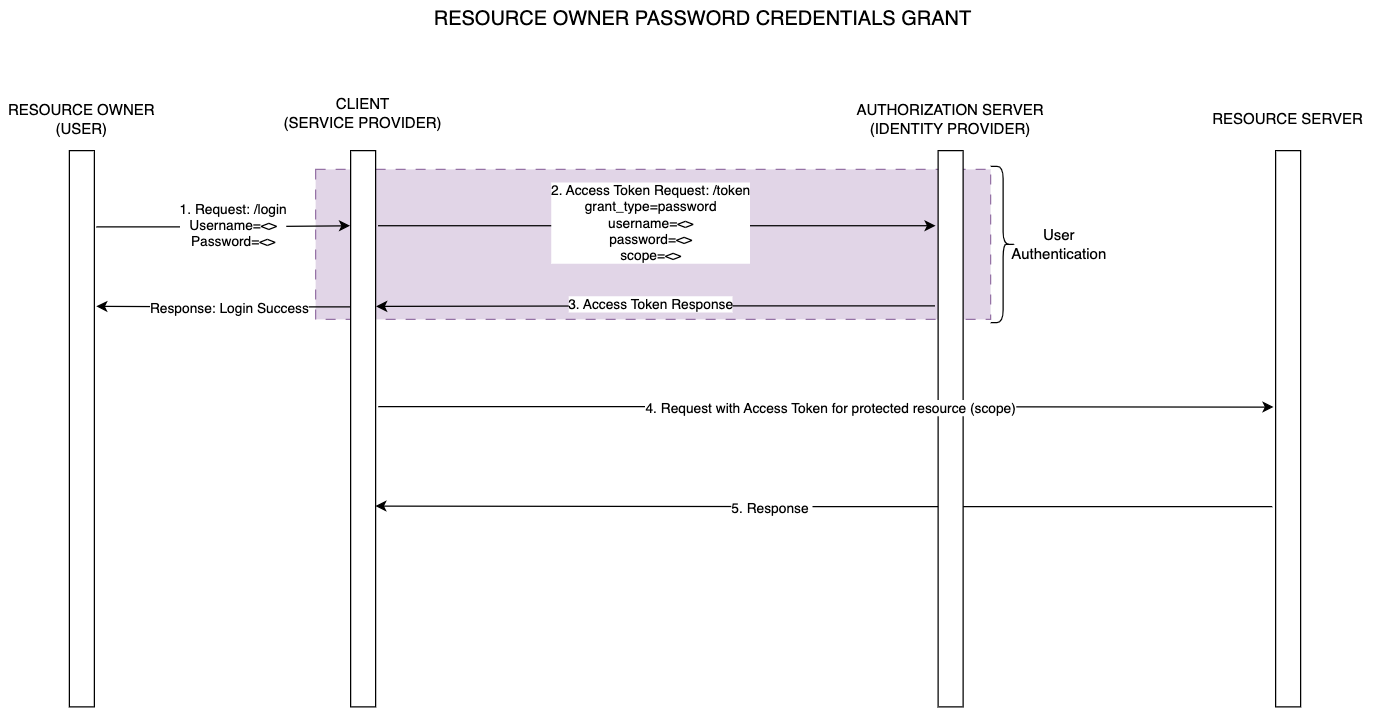
The User issues a login request to the Service Provider by providing the user credentials of the 3 party application (Authorization server)
The client captures the provided credentials and issues the token request towards the authorization endpoint of the authorization server. The grant_type is password.
The Authorization server validates the user and checks if the requested scopes are allowed. On success the authorization server returns the relevant tokens. The user is logged in.
The Client may use the issued access token to further request resources from the authorization server based on authorized scopes.
Client Credentials Grant
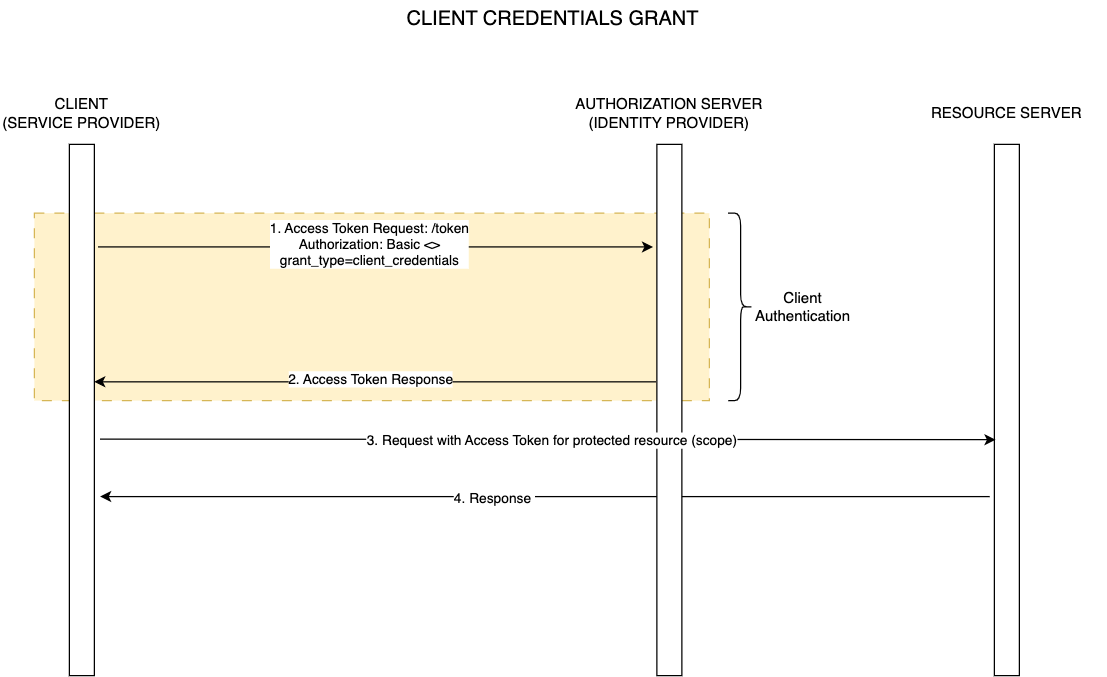
The client issues a token request using Basic authentication via the issued client credentials.
The Authorization server validates the client credentials and issues an access token.
The access token may be used by the client to further request resources. Note that there is no user exposed scope available here. However some OAuth implementations may define scopes against clients and allow requesting scopes for the Client Credentials flow.
Additional Flows
OAuth has been extended with additional flows and use cases since its inception in 2012. Some of the relevant flows are captured below:
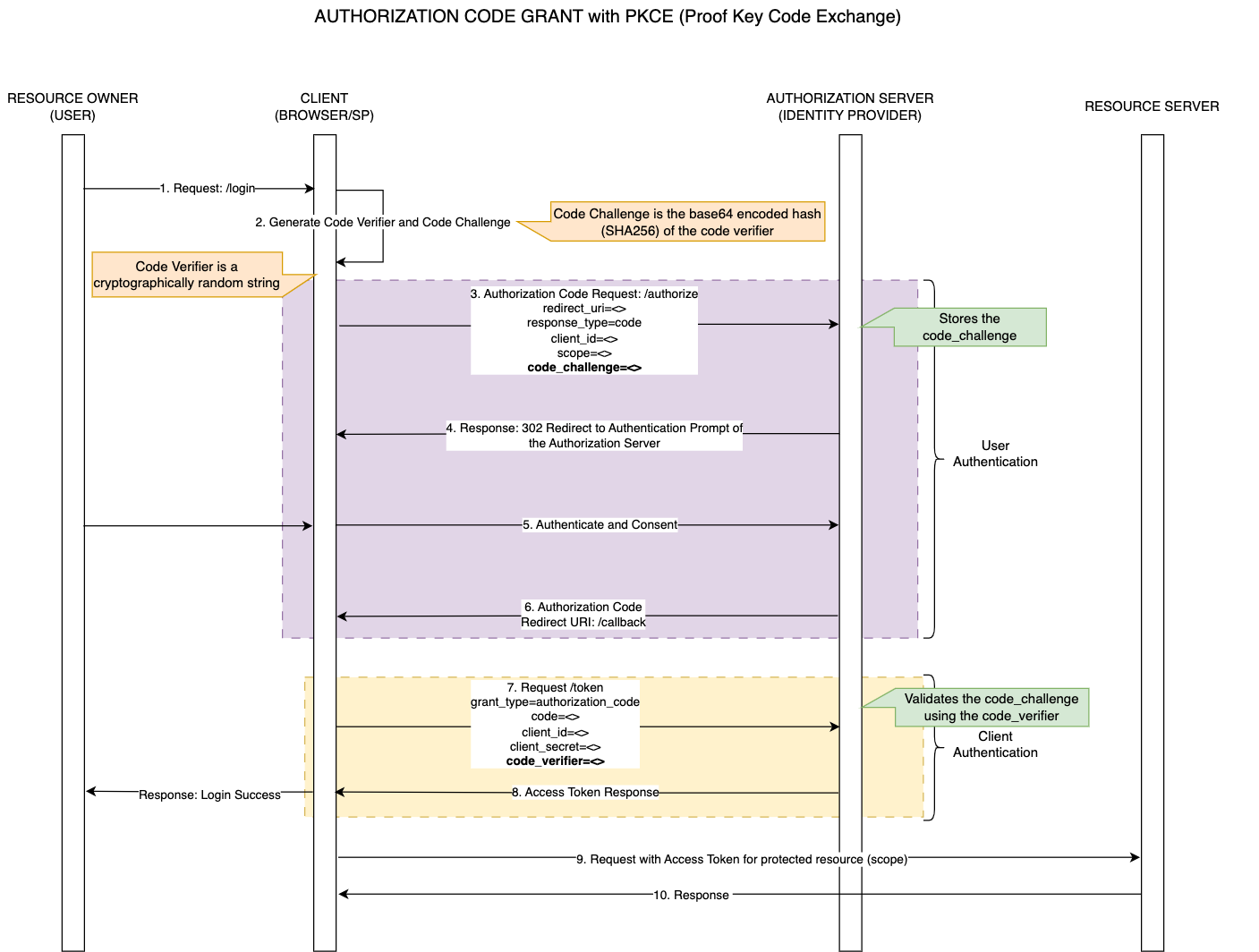
Authorization Code with PKCE - Proof Key Code Exchange
RFC-7636 proposed in 2015 specified the mitigation of authorization code interception attack in the core Authorization Code Flow described above; for native and Single Page Application clients.
Attack Description:
Native/SPA clients cannot securely store the OAuth client secret due to the possibility of decopilation.
The Callback (redirect_uri) may be a custom URL scheme (custom-app://) which potentially allows malicious applications to receive the authorization code requested by the valid OAuth client.
The extension proposes the usage of a dynamically created cryptographically random key called ‘code-verifier‘, which is used to generate a ‘code-challenge’ forwarded as part of the authorization request.
The Authorization server stores the code-challenge for the OAuth client making the authorization request.
The OAuth client (application) issues a token request, passing the ‘code-verifier’ that was used to generate the ‘code-challenge’.
The Authorization server uses the ‘code-verifier’ to validate the stored ‘code-challenge’ before issuing the token to the valid OAuth client.
Note that since, OAuth mandates the usage of TLS for the Authorization server, the exchange of code-verifier/code-challenge is over a secure channel, with the only vulnerable interception being the callback (redirect_uri) towards the OAuth client.
Device Grant Flow
RFC-8628, in 2019 further enhanced the core OAuth 2.0 specification to include support for Internet-connected devices that lack a browser or dont have a viable input interface for users to initiate the authorization flows described above.
This flow can be observed in Smart TVs, Airport kiosks, API clients, etc.
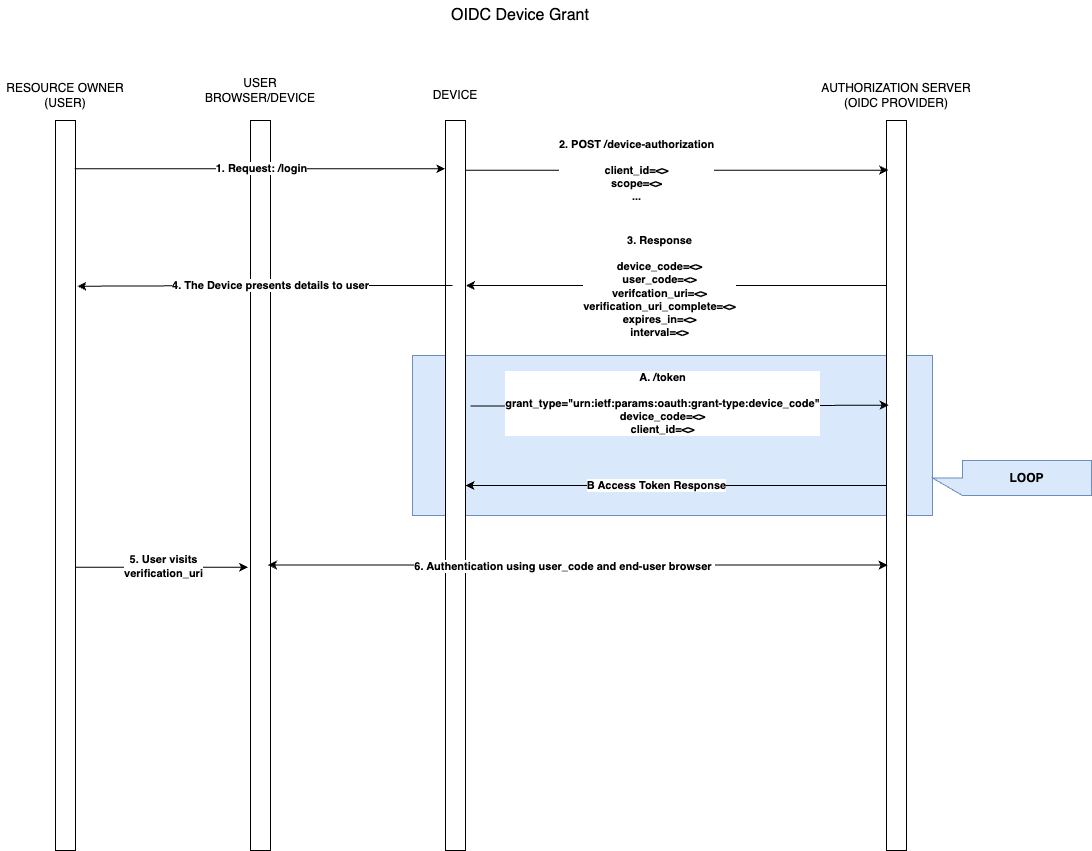
The user initiates login at the device.
The device issues the /device-authorization request using the registered client_id.
The OAuth authorization server responds with the following details:
device_code = The device verification code.
user_code = The end-user verification code.
verification_uri = The end-user verification URI on the authorization server.
verification_uri_complete = The end-user verification URI that includes the user_code (This is meant for non-textual transmissions such as a QR Code)
expires_in = The lifetime of the device_code and user_code.
interval = polling interval for the device to check for authorization status.
The Device displays the details received in #3 to the user.
The User uses an external browser to navigate to the verification_uri.
The User authenticates using the device_code and user_code with the authorization server.
A. The device post receiving the device_code/user_code polls the /token endpoint to get the status of the user authorization.
B. The token response from the authorization server to the device.
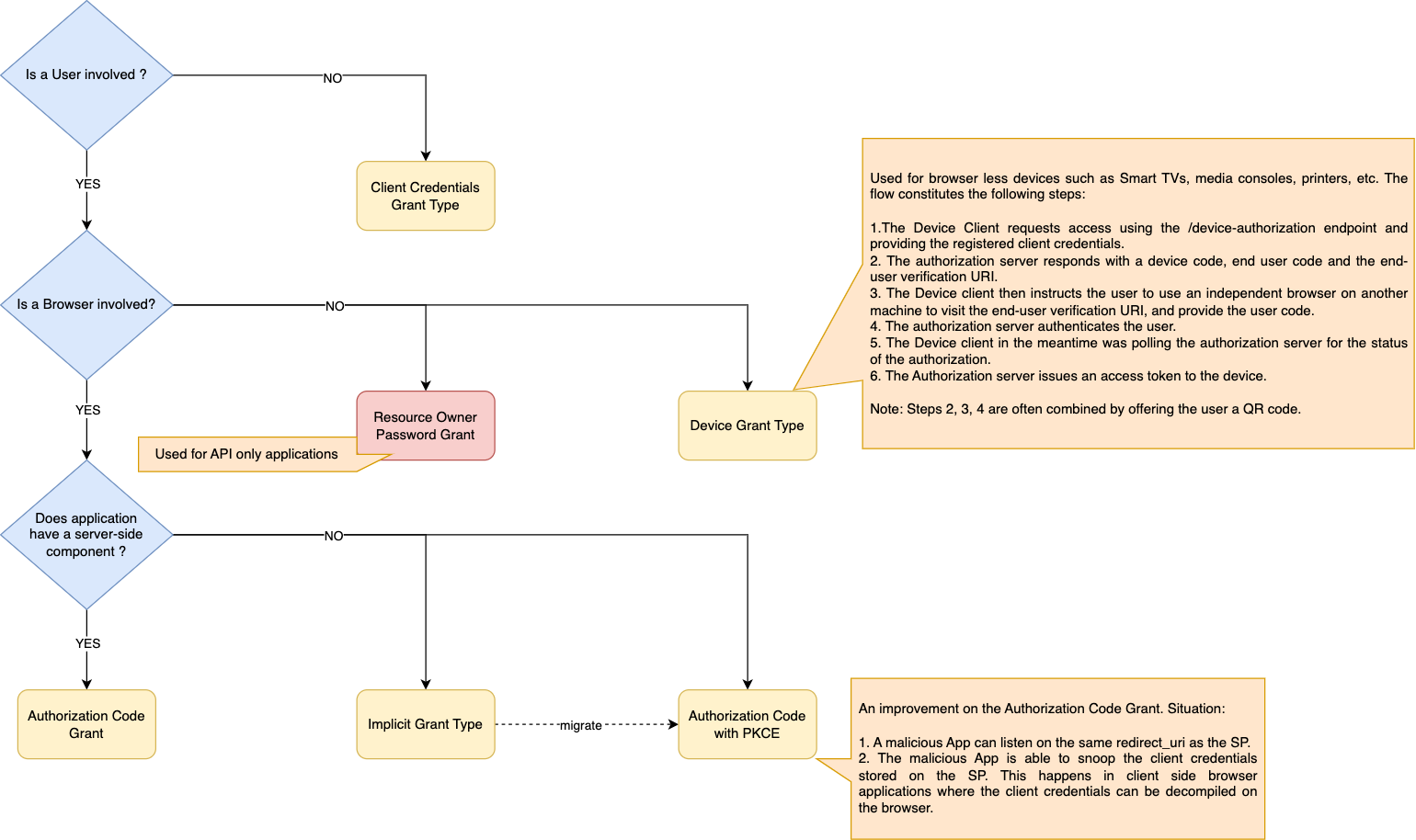
When to use which Flow?
Summary
In this article we covered the predominant OAuth flows. The boundaries of OAuth remain fluid due to subsequent extensions. Hence the compliance of an Authorization server against OAuth can not be strictly defined. The OAuth client/application should refer the supported OAuth flows of any Authorization server, instead of just looking for a simplistic claim for OAuth compliance.
In the following post, we will discuss OpenID Connect which is another popular extension to OAuth.
